
Bookmark Generator
Convert natural language descriptions or other apps' bookmark data into electerm bookmark JSON — ready to import.
Important Notice
AI here runs on the developer’s personal free-tier tokens, so usage limits may kick in. When that happens, you can switch to your own API key — or share your spare free key so every electerm user gets a fallback.
Share your free key →How to import into electerm
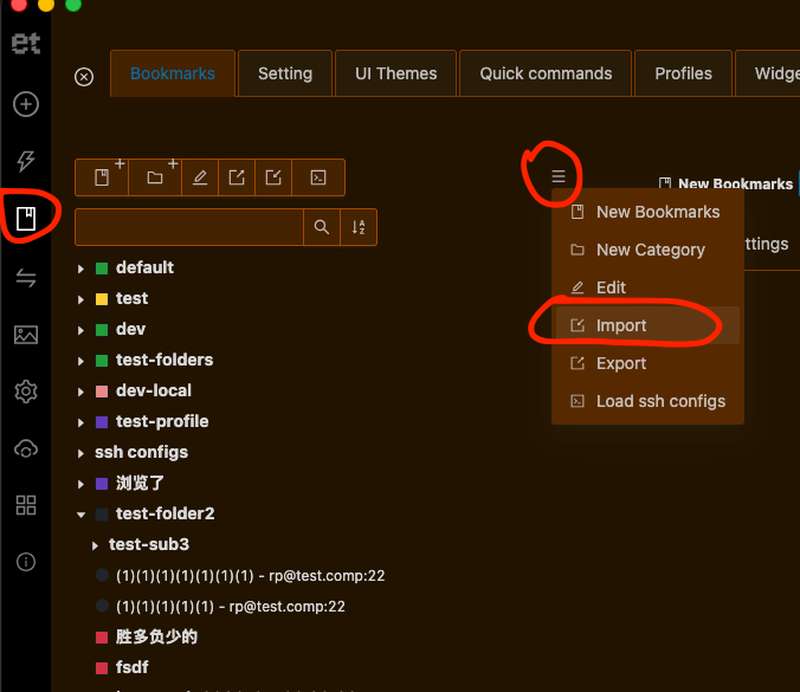
- Open electerm and go to Bookmarks.
- Click the menu icon (≡) in the bookmark panel, then choose Import.
- Select the downloaded JSON file.
Works with electerm desktop, electerm online, and electerm-web.
No quota left? Generate manually with your own LLM
Running low on free-tier tokens? Copy the prompt below — it is the exact same prompt this page uses — and run it in ChatGPT, Claude, Gemini, or any other LLM.
- Copy the prompt template below.
- Replace [[YOUR INPUT]] with your server description or data exported from another app, then paste the whole thing into your own LLM.
- Copy the JSON array it returns, save it as a .json file, and import it into electerm (see above).